Technology
PrimeRole's LinkedIn integration provides valuable insights into the technologies used by companies, directly within your LinkedIn browsing experience. This feature helps you understand a company's technical infrastructure, which can be crucial for various purposes, such as competitive analysis, sales targeting, or recruitment.
How to Access the Technologies Tab
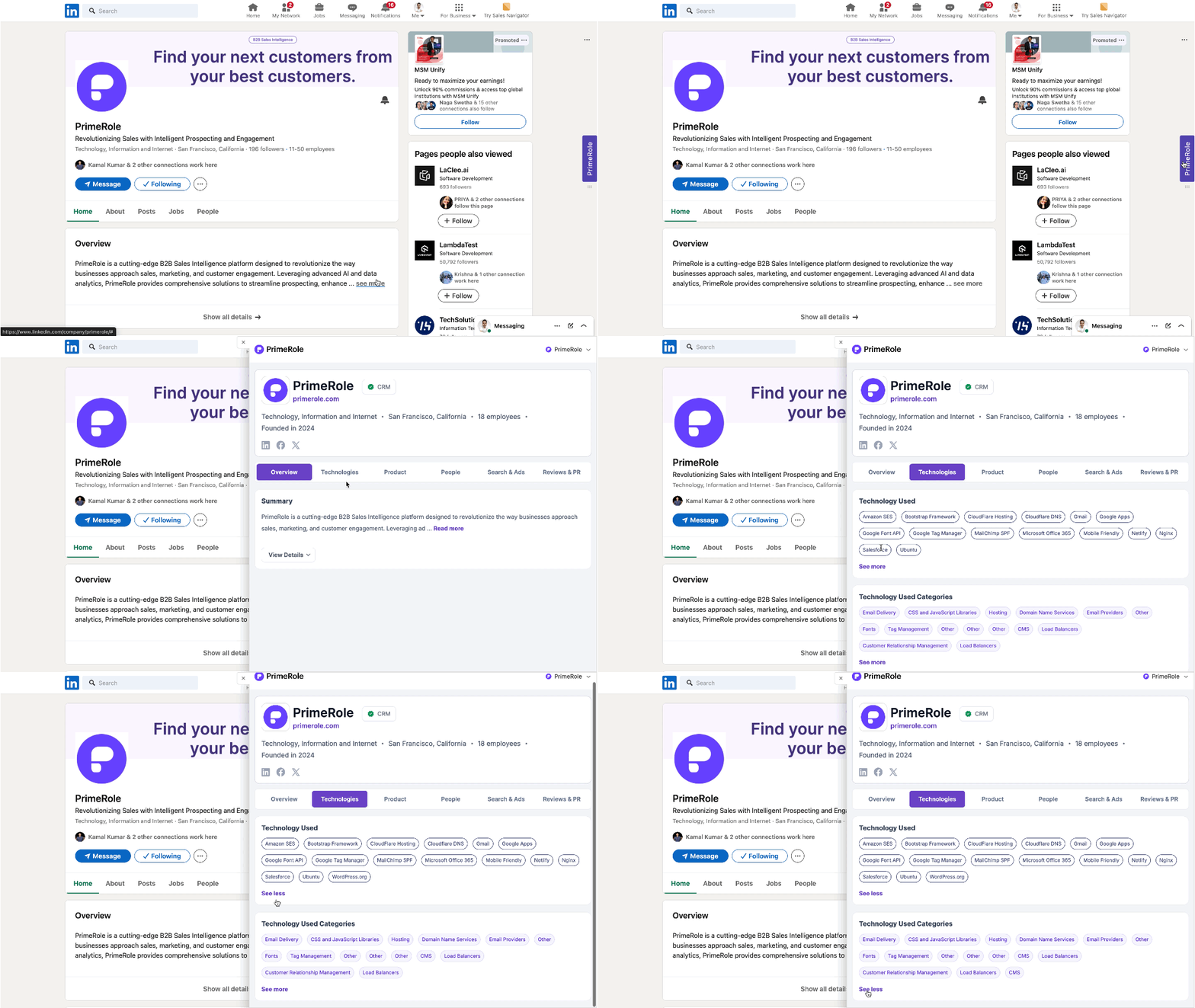
- Connect PrimeRole to LinkedIn: Ensure your PrimeRole account is connected to your LinkedIn account. See the Extension Integration Guide for details.
- Navigate to a Company Page or Tag: Go to a company's LinkedIn page or find a company tag.
- Select the "Technologies" Tab: Once the PrimeRole extension activates, click on the "Technologies" tab to view the technology information.
Benefits of Using the Technologies Tab
- Competitive Analysis: Understand the technologies your competitors are using to identify potential advantages or disadvantages.
- Sales Targeting: Identify companies that use specific technologies relevant to your products or services.
- Recruitment: Gain insights into the technical skills required for roles at a particular company.
- Technology Landscape Overview: Get a quick overview of the technology landscape within a specific industry.